 DocentLens
For museums and galleries
Your commentary, on every visitor's own phone.
Place a QR code beside the work. Visitors hear the commentary your museum has approved on their own phone, in the languages you choose from 34. No app to install and no rental devices to manage.
Pilot museums pay no usage fee until March 31, 2027. Talk to us by email first, or apply with the form in the console. Email: contact@sugaryple.com

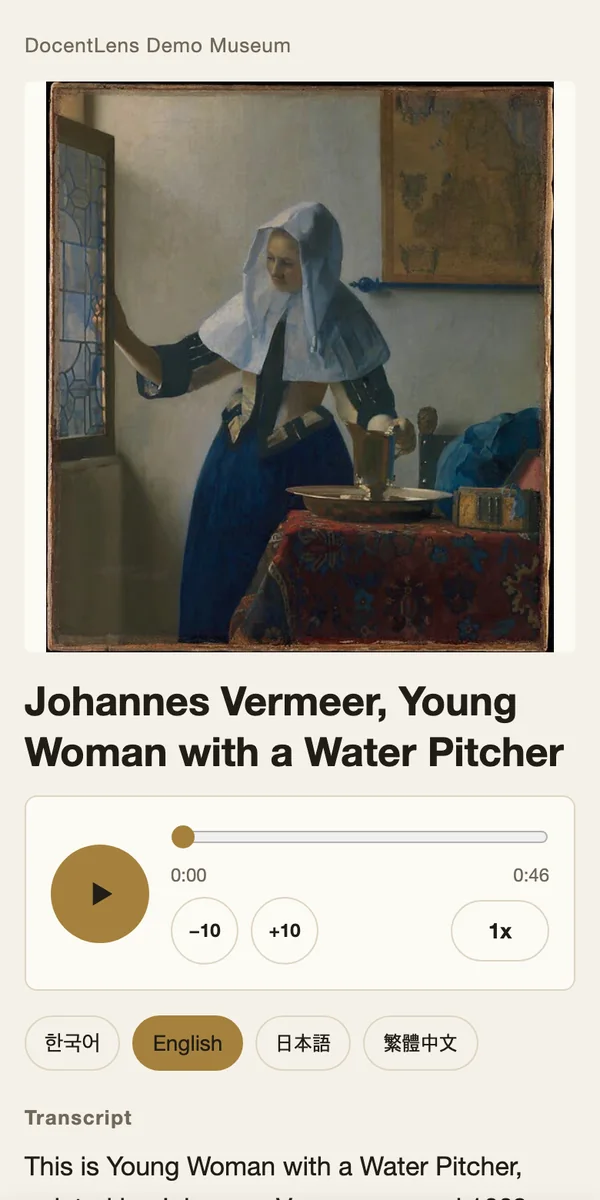
Try it on your phone now
This opens the real commentary screen. No sign-up needed.
Open the demo commentarySee the guide list used with tickets
- 34
- commentary languages to choose from (up to 12 per museum)
- 0
- apps your visitors need to install
- 0
- devices to lend out and charge
- 25mm
- QR code size beside the work
How it works
Place it, scan it, listen. That's all.
Place it beside the work
Put a QR sticker or NFC tag next to the work. Print sheets on A4 as a PDF, or export a list for a print vendor.
Visitors point their phone
The camera opens the commentary in the phone's browser. The language follows the phone's settings and can be changed on screen.
They listen on the spot
They hear exactly the audio you prepared. Nothing is read out that your museum hasn't approved.
GP96 Q8M2s.docentlens.com- With the screen off
- On most phones playback continues with the screen locked, so the phone stays in a pocket and eyes stay on the work (depends on the device and browser).
- Listening speed
- Choose from 0.8× to 1.5×. The chosen speed and language carry over to the next work.
- Commentary to read
- The same script appears on screen, for quiet spaces and for visitors who find listening difficult.
- For everyone
- Open to all ages. No AI runs on this screen, and visitors are never asked to register or enter personal data.
Two ways to use it
Open it to everyone, or sell it as an audio guide
Free for every visitor
Anyone who scans the code can listen straight away. A first step in serving overseas visitors, or a way to tell the stories that don't fit on a label.
- Every work is open to anyone, of any age.
- If you start selling tickets later, the QR codes already in place keep working.
- There is no usage fee during the pilot.
- Even without selling tickets, you can open the guide list, where visitors choose works by guide number or from the floor map.
Sell audio guide tickets
You sell paper QR tickets at the counter. You set the price and all the sales are yours. Our fee stays fixed however many you sell, and we don't ask you to report sales.
- Choose "free" or "ticket" for each work. We suggest leaving one or two highlights near the entrance free as a sample.
- One ticket opens every ticketed work. By default it runs for 8 hours from the first start (set 4 to 24) and can be started 3 times (set 1 to 5).
- Visitors can also choose works by entering a guide number or from the floor map, so you can run it with no QR codes on the walls.
- Saving the commentary in advance helps playback hold up in galleries with weak signal.
- Print tickets on your own printer from a PDF, or export a CSV for your ticketing system.

How to think about the numbers
Annual fee ÷ net income per ticket = tickets you need to sell
Net income is the sale price less tax and printing. We make no promise about ticket sales or income. The annual fee is quoted individually. Please decide after seeing real usage during the pilot.
Console
Update it yourselves whenever the exhibition changes
The QR code stays the same while the commentary changes, so nothing needs reprinting. The console lives at manage.docentlens.com and runs in a browser.
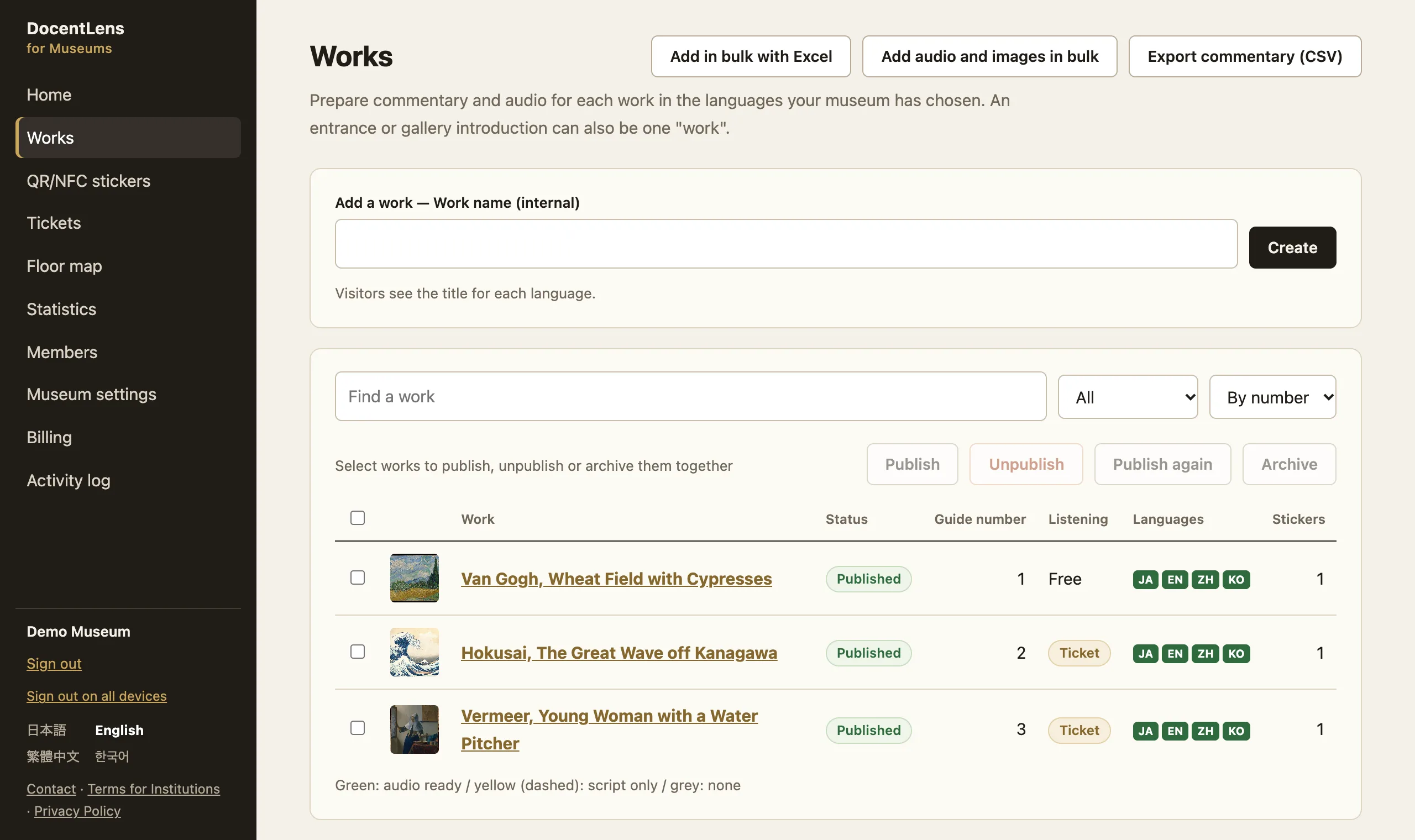
- Commentary
- Edit titles and scripts for each work in the languages you choose (up to 12), or add many works at once from Excel.
- Audio
- Create a synthesized voice from the script, or use your own recording. WAV, M4A and MP3 are converted in the browser before upload.
- Publish and restore earlier versions
- Check the exact visitor screen before publishing. Published versions are kept unchanged, and you can return to earlier content or unpublish a work at any time.
- Print and NFC
- Print QR sticker and ticket sheets on A4 or save them as a PDF. For NFC tags, you get the list of addresses to write and instructions for writing them.
- Floor map
- Place pins for works on your floor plan image and they appear on the visitor's screen.
- Statistics
- See totals by day and by work. Individual visitors' behaviour is not recorded.
- Members and activity log
- Separate admin, editor and front desk roles. Front desk staff can only check a ticket's status from its number. An activity log shows who changed what, and when.
- Invoices
- View and print your usage fee invoices on screen.
Trust and safety
Built on the premise of not holding visitor data
- Visitor screen
- No accounts. No third-party scripts, no analytics and no AI at runtime.
- Cookies
- Only a browser that has started a ticket gets a cookie: one signed cookie with no ticket number or device-specific value. Other visitors get none.
- Records
- Statistics are daily totals per work. Our application logs record neither codes nor IP addresses. What Cloudflare processes when delivering the pages is set out in the Privacy Policy.
- Staff sign-in
- Staff sign in with a one-time email link. We store no passwords.
- Where data lives
- Commentary, audio and console data are stored on Cloudflare. The script goes to Google Cloud only when you use a synthesized voice or machine translation.
- Change history
- Published versions cannot be rewritten, and every change made in the console goes into the activity log.
- Operator
- Sugaryple, a sole proprietorship in Japan. N&E BLD.6F, 1-12-4 Ginza, Chuo-ku, Tokyo. contact@sugaryple.com
Pilot
No usage fee until March 31, 2027
We are looking for our first three facilities to start with us. The conditions below apply to facilities taking part in the pilot.
- Fee
- Free until March 31, 2027. If you sell tickets, all the sales are yours.
- Production
- We draft the scripts and produce the audio. All we ask is that you check the content. We agree the number of works up front.
- Afterwards
- Nothing switches to paid automatically. If you continue, there is a fixed annual fee based on the number of published works, and we explain the amount in advance.
- What we ask
- Share the usage counts and tell us frankly what you think.
When you apply, we review it and then give you the console. Or email us directly: contact@sugaryple.com
FAQ
Questions we often hear
Can a public museum sell tickets?
In Japan, a directly run public museum needs a legal basis, such as a local ordinance, to sell them. Until then, a licensed private party such as the museum shop or a Friends organization can sell them, the museum can pay the fee and offer listening free, or you can use free tickets during the pilot. Museums run by a designated manager may be able to sell them as their own business.
Who issues and sells the tickets?
Your museum is the issuer, the seller and the provider of the commentary. We act as your contractor for issuing numbers and running the system. A ticket only works at the museum that issued it.
What about refunds?
How refunds work at the counter is your decision. If a visitor says a ticket won't work, the usual remedy is to swap a ticket sold that same day for a new one. Who bears refunds caused by an outage on our side is set out in the contract.
Can children use it? Does it use AI?
The visitor screen is open to all ages, and no AI runs when commentary is played. Machine translation and synthesized voices in the console are external services that use AI technology, and only scripts your museum has checked and published reach visitors. You can also upload your own recordings. The DocentLens app is a separate product: an AI commentary app for ages 18 and over, and it does not play your commentary. The visitor screen shows no notice or advertising for that app.
We already contract a rental audio guide.
Please check your current contract for exclusivity and term. We can also discuss running only free works alongside it, or switching when the contract renews.
What about data use and earphones?
A two-minute commentary is roughly 1 MB or less. It uses the visitor's own mobile data, so museum Wi-Fi isn't required. The ticket screen and guide list ask visitors to use earphones; please remind them in the galleries as well.
What if a phone's camera can't be used?
Open s.docentlens.com and type the code printed on the sticker. On a sticker with an NFC tag, a compatible phone only has to touch it. Ticket numbers can be entered at s.docentlens.com/t.
Can you stop tickets being shared?
Only casual sharing. Each ticket can be started a limited number of times and stops working when its time is up. It cannot stop someone recording the audio or copying it while it is open. Please weigh this when you decide.
Does it work where there's no signal?
In galleries with weak signal, saving the commentary from the guide list in advance helps playback hold up. Opening a new page from a QR code beside a work still needs a connection, so guide numbers are the better choice there. Browsers may also clear saved commentary. Please test it in your galleries first.
What happens if we stop?
Turning ticket sales off opens every work for free, and you can unpublish any work at any time. For ending the contract and what remains afterwards, please write to contact@sugaryple.com. You can export your commentary as CSV from the console at any time. The CSV contains text only, not audio files. Ask us if you need the audio as well.
Which languages are supported? Is Simplified Chinese available?
34 languages are supported, including Japanese, English, Chinese (Traditional and Simplified), Korean, Spanish, French, German, Thai, Vietnamese, Indonesian and Arabic. Each museum can choose up to 12, and Simplified Chinese is one of the choices. The visitor screen opens in the browser's language; for works without commentary in that language, commentary in another language plays and the visitor can switch. Audio can't be made automatically for Croatian, so upload a recording for it.
How do we get a quote?
Email us your museum's name, roughly how many works, and whether you plan to sell tickets. We reply within a few business days, talk for about 15 minutes, and then send you terms.
Start with fifteen minutes. Tell us about your museum.
Tell us about your overseas visitors, your labels and your current audio guide. We'll walk you through it while you listen on your own phone.
Or email us directly: contact@sugaryple.com